
When an app cannot find a device, start with the exact model, correct app and documented discovery mode. Then check the phone’s Bluetooth access while the device is unworn. Our app-controlled chastity collection includes different connection systems, so a pairing instruction for one model should not be assumed to work for another. Record what appears before resetting anything.
Confirm the Model and the Correct App
Read the exact device model and the app name in its current instructions. QIUI and LOCKINK products do not share a universal discovery path, and even two products from one maker can have different pairing states. Confirm the app publisher using the manufacturer reference rather than a similar icon in a store search. Check the selected phone’s supported system version and store region before diagnosing the hardware.
The official-app checklist explains how to verify a download. Here, keep the task narrow: the app’s scan shows no device at all. A device that appears and then fails to respond is a different problem; record which stage you have reached before changing settings.
Check the Documented Discovery Procedure
Put the device in the discoverable state described for that exact model, with it unworn and accessible. Follow its power and charging instructions first. Do not copy a button hold, light pattern or default PIN from a different cage or key box. If the manual omits a discovery step, ask the manufacturer for it instead of experimenting with reset combinations.
Some low-energy Bluetooth devices are discovered inside their dedicated app and do not need to appear as a normal item in the phone’s Bluetooth settings list. Check where the manual directs you to scan. An empty system list and an empty in-app list are different observations; neither alone proves the device is faulty.
Review Bluetooth or Nearby-Device Access
Confirm Bluetooth is enabled on the intended phone and the app has the relevant nearby-device or Bluetooth permission for that operating system. On some phones a permission prompt appears only after starting a scan; on others it can be reviewed in app settings. Permissions and menu labels vary by OS release. Avoid granting unrelated access as a generic troubleshooting step.
Keep the phone close enough for the manufacturer’s documented pairing procedure, with one known device in the test area. If another phone previously owned the device, do not attempt to bypass binding or forcibly reset a lock. Ask the provider about legitimate transfer from the original account before proceeding.
Record What the App Can and Cannot See
Make one observation at a time, using the correct in-app scan. This log is more useful to support than a series of unrecorded retries.
| Check | Record | Meaning of a failure |
|---|---|---|
| Model and app | Exact names, app version and phone OS | May be the wrong software |
| Discoverable state | Manual step performed, power state | Scan may begin too early |
| Permission | Bluetooth/nearby-device setting | App may not be allowed to scan |
| In-app scan | Device name, identifier or no result | Escalate with precise symptom |
| Other account | Known binding history | Request authorized transfer guidance |
Do not publish device identifiers or account data in a public support forum. Share only what the official support channel asks for.
After Discovery: Check the Next Connection Step
If the device finally appears, note whether the app then pairs, asks for account approval or reports an error. Discovery is only the first stage. Follow the current manual for the next step; a successful scan does not prove that a vibration, stimulation or box-opening command will work. Stop and request support if the device reports someone else’s binding or an unexpected locked state.
ThrillCage, Metal KeyPod and Bee Sting illustrate separate model paths. The first controls listed electronic cage functions, the second controls a physical key box, and the third belongs to a different app family. Test each off the body, with its own instructions, before describing it as connected.
QIUI ThrillCage App-Controlled E-Stim Chastity Cage
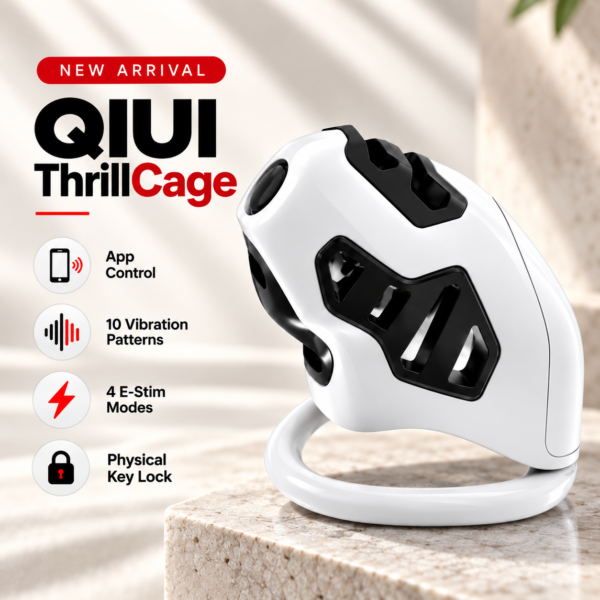
ThrillCage is a QIUI electronic-function example. Discovering it in an app does not turn its mechanical-key release into an app unlock; confirm model-specific pairing instructions. See the product details and confirm the selected option before ordering.
QIUI Metal KeyPod App-Controlled Key Lock Box with Timer
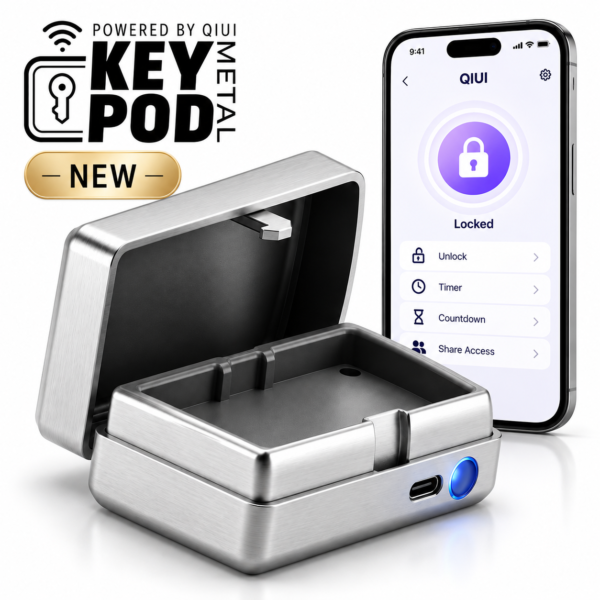
Metal KeyPod is a separate Bluetooth/app device for a physical key. Verify its own discovery route, account binding and key fit rather than applying ThrillCage steps. See the product details and confirm the selected option before ordering.
LOCKINK Bee Sting 10-Mode App-Controlled E-Stim Chastity Cage

Bee Sting belongs to the LOCKINK app family. Its discovery and release details must come from its current manual; a QIUI button sequence is not transferable. See the product details and confirm the selected option before ordering.
Once the exact discovery stage is recorded, support can address the real failure without a speculative reset. Keep the device unworn until pairing, controls and release are understood.