
The Metal KeyPod listing describes an offline timer: its local countdown can trigger release without receiving a live remote command when the timer ends. That does not establish every setup or recovery rule. Use the Metal KeyPod as the starting point for separating connection requirements during setup, countdown and release.
Separate Setup, Countdown and Release
“Works offline” can describe one stage of a timer without describing every stage. Setting a countdown may require an app and an initial connection. The countdown may then run locally. At zero, a release action may occur. Those are three different questions, and the product page needs to support each answer separately.
For long-distance use, also distinguish the partner’s internet connection from the box’s local Bluetooth link. A remote command and an already-started local countdown are different mechanisms. The existing long-distance control guide covers the broader relationship workflow; this article stays with the timer’s connection dependency.
What Metal KeyPod Says About Offline Timing
Metal KeyPod’s listing describes an offline countdown that can trigger release at the end without a live remote command. That supports a narrow conclusion: once its timer has been set correctly, a continuing internet connection is not described as necessary for the countdown’s end-of-timer action. It does not tell us every setup step, whether a partner can change the timer without a connection, or how a low battery behaves.
USB-C charging is listed, but a charge port is not an emergency-access guarantee. Check the exact manual for battery warnings, premature end requests and recovery before placing a needed key beyond reach. Do not substitute a generic QIUI app screen for this model’s instructions.
QIUI Metal KeyPod App-Controlled Key Lock Box with Timer
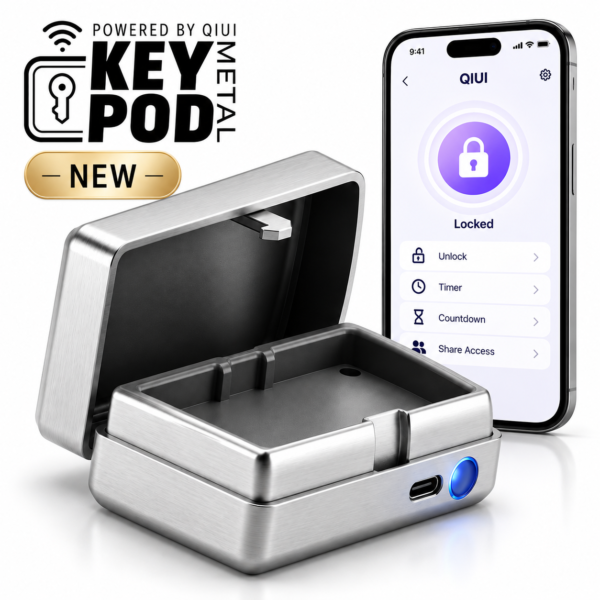
Metal KeyPod is the relevant box when an offline local countdown for stored-key access is the stated priority. Its listing supports that narrow timer claim; it does not establish power-failure opening or unlimited remote changes after setup. See the product details and select the exact option before ordering.
What Is Still Model-Specific on the Original KeyPod
The original KeyPod lists Bluetooth pairing, timed access and opening records. Those facts do not establish that it shares Metal KeyPod’s offline countdown design. A timer label alone can refer to different implementation paths; the checked original listing does not settle what happens after the phone leaves Bluetooth range or the internet drops.
If you own the original model, consult its supplied instructions or ask the seller for a direct answer about the setup, running and expiry stages. Do not decide from the metal model’s page. Opening records are a listed feature of the original, but how those records synchronize after an offline period also needs model-specific evidence.
QIUI KeyPod App-Controlled Timed Chastity Key Box

The original QIUI KeyPod lists Bluetooth pairing, timed access and opening records. Its checked page does not establish the Metal KeyPod’s specific offline operation, so verify each timer stage for the original before depending on it. See the product details and select the exact option before ordering.
Use an Unlocked Test to Verify the Stages
A controlled test with no key trapped can answer operational questions without relying on assumptions. Start with the box unlocked and empty, follow its actual setup instructions, run a short permitted timer, then observe the result with the phone disconnected. Never treat that test as a substitute for the product’s release and low-battery instructions.
| Stage | Question to record | Metal KeyPod listing | Original KeyPod listing |
|---|---|---|---|
| Setup | Is an app, Bluetooth or internet required to start? | App access listed; exact setup dependency to verify | Bluetooth pairing listed; internet dependency to verify |
| Countdown | Does a started timer continue without live connection? | Offline countdown listed | Not established by checked listing |
| Expiry | What action occurs at zero, and with what power? | Local end-of-timer release described; power behavior to verify | Timed access listed; offline expiry behavior to verify |
Write the actual model, firmware or app version and test conditions beside the result. A single unlocked test should not be generalized to all units, updates or low-battery states.
Choose Between a Key Box and a Timed Cage
Metal KeyPod times access to a physical key. MetalShake is a cage listing app-controlled locking and an offline timing function. Their timers act on different objects: one controls a separate box, while the other is part of the cage’s electronic-lock system. Neither product should inherit the other’s release behavior.
Choose the key box if you already use a physical-key cage and want a separate access routine. Consider a timed cage only after its exact locking, offline and early-release instructions are clear. In either case, preserve a practical route for ending the session if plans change.
QIUI CAGINK MetalShake App-Controlled Metal Vibrating Chastity Cage

MetalShake is an electronically locking cage with a listed offline timing function and vibration. It is included to show the different controlled object: the cage lock, not a separate key box. Its low-battery and early-release behavior still needs exact instructions. See the product details and select the exact option before ordering.
The answer is model-specific: Metal KeyPod lists a local offline countdown, but setup, changes and power recovery each need their own evidence. Test empty and unlocked, then use only the release procedure documented for your actual device.