
A phone can control a cage’s electronic functions while the lock still needs a physical key. Other designs use electronic locking, so the release method deserves its own check. Compare the smart and electronic chastity collection by how access works, which parts need power and what the exact model’s instructions say about local release.
The question is not simply whether a product is “smart.” It is who can open the restraint when the phone is unavailable, the battery is low, or the planned session ends earlier than expected. Control of vibration or E-Stim, control of a lock, and access to a key are three separate decisions. Treating them as one feature can lead to buying the wrong setup.
Start with the release mechanism
Read a product listing in this order: identify the physical part that keeps the cage closed; identify the action that releases that part; then identify what, if anything, the app controls. A Bluetooth connection may adjust an electronic function without moving a mechanical lock. A timed key box may hold a key without unlocking the cage. Even two products from the same app ecosystem can have different release paths.
Before purchase, ask for the exact model’s instructions if the listing does not explain the release sequence. Check whether a local action is possible, what happens when the battery runs down, and whether another person can reach the necessary key or control. Do not assume that a timer expiry, app disconnect, or power loss will automatically open anything. The existing smart-cage buying guide covers the broader feature checklist; this comparison focuses on getting the device open.
When a physical key suits your setup
A mechanical key makes the release action easy to understand: the lock opens with the matching key. That can be attractive if you want the app for stimulation while keeping the actual restraint independent of a phone connection. It also creates an obligation to know where the key is, who can get it, and whether a spare is accessible under your agreed plan.
For a partner-led arrangement, write down the release route before the device is worn. If the key is stored away from the wearer, discuss how it can be retrieved when either person wants the session to end. A backup key only helps if it is actually available. Model-specific fit and supplied components still matter; a “physical key” label alone does not tell you how many keys come in the box.
QIUI ThrillCage: app functions, physical-key restraint
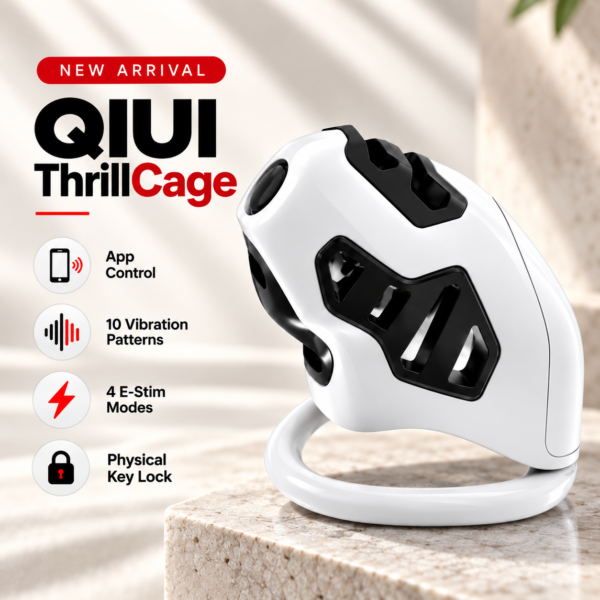
ThrillCage is the clearest example here of keeping electronic play and release separate. Its listing describes app-controlled E-Stim and vibration, while its lock uses a physical key. The app is therefore not a substitute for having the correct key. A KeyPod can be considered separately for key storage; it is not included merely because this cage works with a key.
What an electronic lock depends on
An electronic lock changes the questions. Find out what powers the lock, which device or local control operates it, and whether any fallback is documented for the exact model and version. “App-controlled” is too broad: it might describe a lock, a motor, vibration, E-Stim, or a combination. Screenshots and marketing names are less useful than an explicit release instruction.
It is especially important to separate a scheduled lock state from an emergency access method. A listed offline timer tells you that a timing function is offered; it does not establish how the device behaves if its battery is empty, if a phone is lost, or if a session must stop before the timer ends. If the instructions are unavailable, leave those cells in your checklist marked “unverified” rather than filling them with a convenient assumption.
QIUI CAGINK MetalShake: electronic locking and vibration

MetalShake provides a useful contrast to ThrillCage. The listing identifies an aluminum-alloy smart cage with app-controlled locking and vibration, plus an offline timing function. That makes the lock itself part of the electronic system. Confirm its exact low-battery and early-release instructions before choosing it; the listed timer alone does not answer either question.
Where a separate key box fits
A key box changes access to a physical key, not the cage’s locking mechanism. If a cage needs a key, placing that key in a controlled box adds a second step: first open the box, then use the key on the cage. This distinction matters when comparing a physical-key setup with an electronic-lock setup. The box can shape a keyholder routine, but it cannot turn a mechanical cage lock into an app-operated lock.
Check the key’s dimensions against the box’s internal space, verify exactly which box version is offered, and read its timer conditions. Keep the key-access plan separate from the cage’s own release instructions. A USB-C charge port and an offline timer are useful listed attributes, but neither is a guarantee about what happens during a power failure.
A release-method comparison worksheet
Fill one row for every candidate, using only its own product page and instructions. An empty cell is a reason to ask the seller a precise question, not to assume all smart cages behave alike.
| Question | Physical-key cage | Electronic-lock cage | Key box with physical-key cage |
|---|---|---|---|
| What controls stimulation or vibration? | Model-specific app or remote, if listed | Model-specific app or remote, if listed | The cage’s own system; the box does not control it |
| What controls the lock? | Matching physical key | Documented electronic lock control | Matching physical key after box access |
| What must be available for release? | Correct key and access to the lock | The model’s documented release route | Box access, then correct key |
| What must you verify? | Key count, spare location and access | Low-battery, offline and early-release instructions | Key fit, timer rules and box power behavior |
A practical decision rule follows: choose a physical-key model if you want a mechanically separate release method and can manage the key responsibly. Consider an electronic-lock model only after its exact fallback instructions are clear. Add a key box only when you specifically want a separate key-access routine and have verified that your key fits.
QIUI Metal KeyPod: an accessory for key access
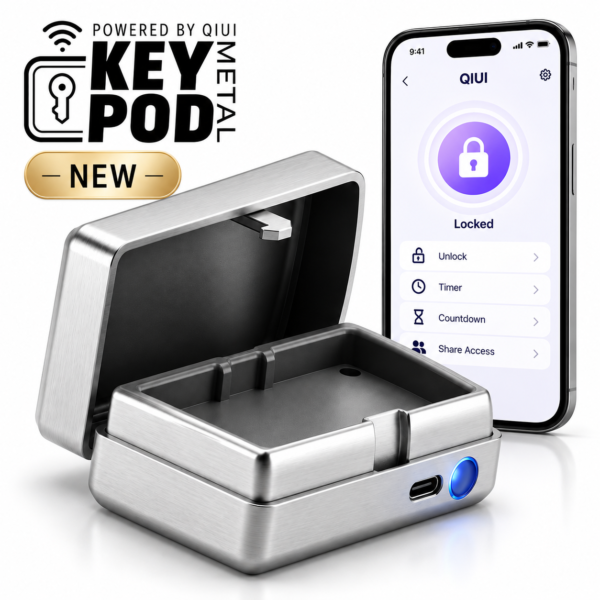
Metal KeyPod is a metal key-storage box with listed QIUI app access, an offline timer and USB-C charging. It suits a setup where the restraint already uses a physical key and the partners want to manage access to that key. It is not a cage and does not release one directly. Check the interior fit and the exact timer and power behavior for the box you purchase.
Whatever route you choose, keep the release plan specific to the model in hand. Agree on who can end the session, confirm the required key or control is available, and stop if the actual instructions do not match the listing. That small check is more useful than any broad “smart” label.