
For Locktober, prepare the equipment and access plan before making a schedule. Confirm the selected cage, charging items, control permissions and a practical way to pause. The app-controlled chastity collection can help you compare different setups, but the useful choice is the one that matches your agreed plan rather than a fixed challenge length or a larger feature list.
Write down what you are planning
Locktober can be a useful prompt for shared planning, but a calendar label should not set wear duration, intensity or an obligation to continue through discomfort. Decide what kind of activity, communication and access you actually want. A plan can be as short or flexible as needed; check the equipment before committing to any schedule.
The smart-chastity beginner guide explains general device selection and setup. This checklist concentrates on what to inspect before a particular planned activity, without reprinting a full pairing tutorial.
Check the device and selected components
Start with the exact selected model and every component needed for its listed function and release. ThrillCage, for example, lists app-operated E-Stim and vibration while its restraint opens with a physical key. Verify the chosen cage, ring, charger and two-key package. An app that controls functions cannot replace an accessible key.
Record where instructions are saved, how the device is powered and whether the relevant phone or remote is available. Confirm the selected ring and cage dimensions before the planned event. Do not assume a product image shows the complete package or that one QIUI accessory is automatically included with another.
QIUI ThrillCage App-Controlled E-Stim Chastity Cage
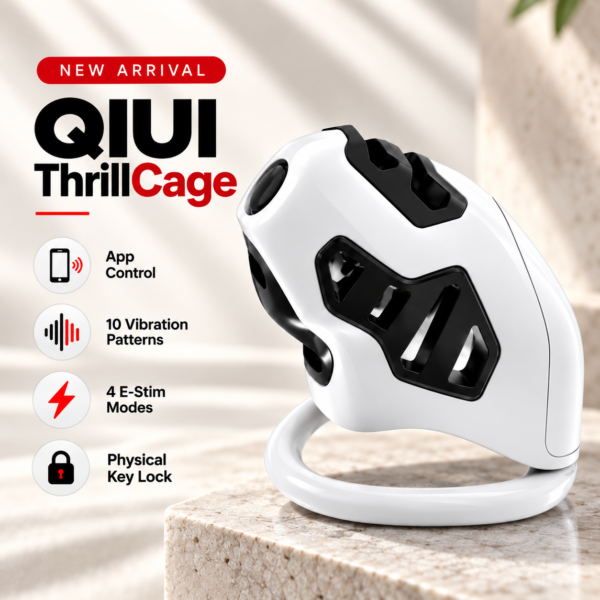
ThrillCage illustrates why the checklist separates app functions from a physical key. Verify its selected fit, two keys and charging parts, then test release independently of E-Stim or vibration controls. See the product details and confirm the selected option before ordering.
Test supported controls before the planned activity
Test the selected device off the body using its supplied instructions: can the intended control connect, can the documented function be stopped, and can the physical lock open? For the 9-Mode app vibrating cage, the app manages vibration, while the separate physical lock uses keys. Verify both paths rather than treating pairing as proof of release.
Check the battery or charging status and any required controller or phone compatibility. If a function behaves unexpectedly, pause and consult the device manual or seller; a calendar goal is not a reason to improvise wiring, change undocumented settings or ignore discomfort.
9-Mode App-Controlled Vibrating Chastity Cage with Four Rings
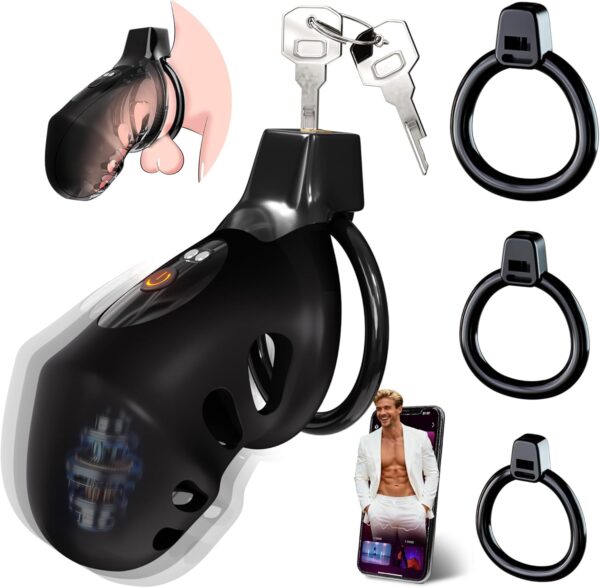
The four-ring 9-Mode vibrating cage gives an app-control example with a separate keyed lock. Confirm the chosen ring package and both keys before treating a successful app pairing as ready-to-use equipment. See the product details and confirm the selected option before ordering.
Agree on pauses and local access
State who can stop an activity, where a physical key or documented local release is available, and what happens when a phone, app or remote is unavailable. A remote participant’s reply should never be the only possible response to a pressing issue. Keep the plan compatible with work, sleep, travel and changing circumstances.
A key box can manage custody of a key, but it cannot electronically unlock a manual cage. If Metal KeyPod is considered, first confirm that the real key fits and that its current instructions explain normal and early access. Keep the box’s timer separate from the cage’s physical release.
Use a reusable Locktober equipment checklist
Copy this table to a private planning note and fill it from the exact product pages. A blank is a task to resolve, not a reason to assume the item is present.
| Check | What to record | Done? |
|---|---|---|
| Selected device and size | Model, cage, ring, variant | □ |
| Controls | App or remote tested per manual | □ |
| Power and parts | Charging, cables, included components | □ |
| Release | Key or documented local path tested | □ |
| Pause plan | Who can stop, where help is available | □ |
| Key storage | Optional box fit and access instructions | □ |
Revisit the checklist when equipment or participants change. There is no need for a thirty-one-day endurance rule or a higher setting simply because a month has a theme.
QIUI Metal KeyPod App-Controlled Key Lock Box with Timer
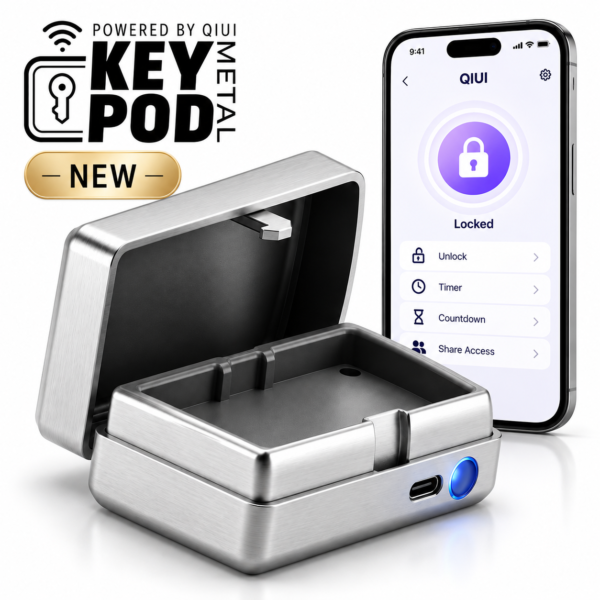
Metal KeyPod is only optional key storage for a physically fitting key. Its timing controls do not release the cage, and early-access instructions should be read before including it in a plan. See the product details and confirm the selected option before ordering.
A useful Locktober plan is one that can be paused, revised and ended through a documented local access path. Complete the equipment checklist before treating any calendar date as binding.